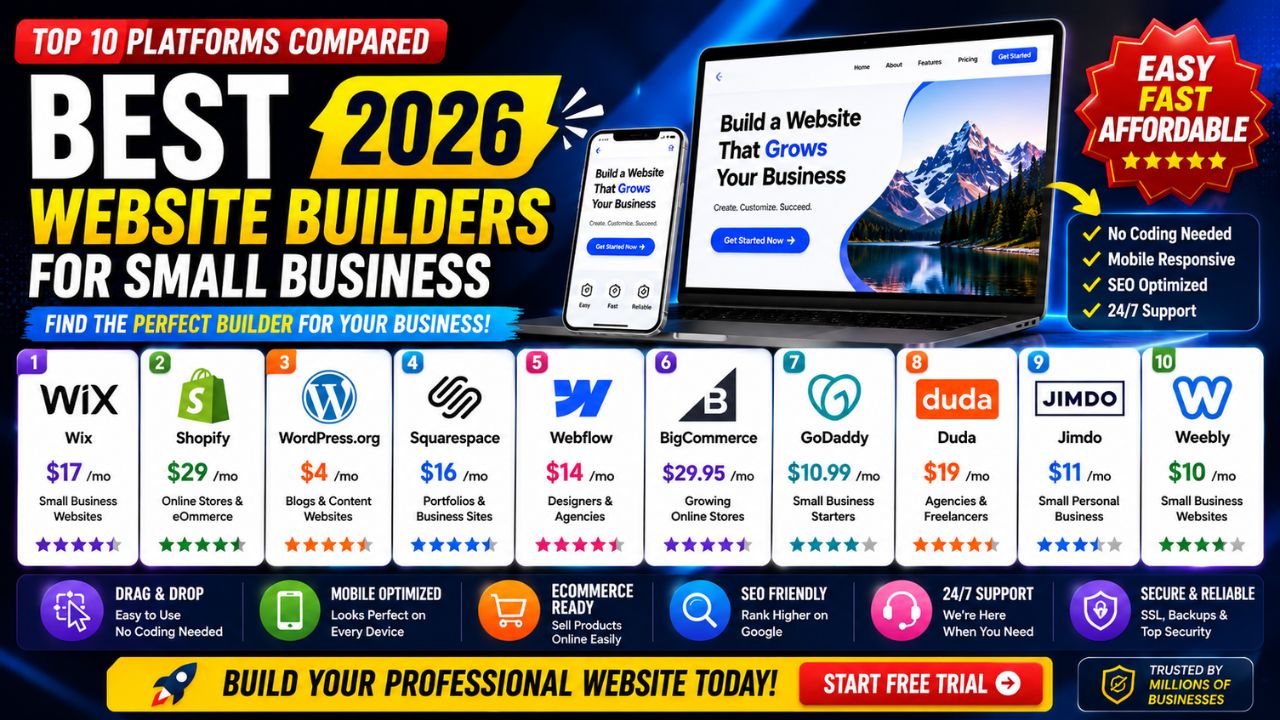
Best Website Builders for Small Business 2026 – Top 10 Platforms Compared
Your website is often the first impression potential customers have of your small business. In 2026, a professional, functional website is not a luxury—it's a necessity. But with so many platforms available, finding the best website builder for small business needs can feel overwhelming.
Whether you need an online store, a portfolio, or a simple information site, the right platform can save you time, money, and frustration. In this comprehensive guide, we'll compare the top 10 website builders for small business based on features, ease of use, design flexibility, e-commerce capabilities, and value for money.
We'll help you cut through the noise and find the perfect builder for your unique business needs. Let's dive in.
📑 Table of Contents
- 1. What to Look for in a Small Business Website Builder
- 2. Top 10 Website Builders for Small Business (2026)
- 3. Side-by-Side Comparison Table
- 4. Best Website Builders for E-commerce
- 5. Best Website Builders for Design & Portfolios
- 6. Best Website Builders for Blogging & Content
- 7. Pros & Cons of Popular Website Builders
- 8. Hidden Costs of Website Builders
- 9. Expert Tips for Choosing Your Builder
- 10. Common Mistakes to Avoid
- 11. Frequently Asked Questions
- 12. Conclusion: Choose Your Best Platform Today
1. What to Look for in a Small Business Website Builder
Before we dive into specific platforms, it's essential to understand the criteria that make a website builder for small business truly effective. Here are the key factors to consider:
- Ease of Use: As a busy business owner, you don't have time for a steep learning curve. Look for intuitive, drag-and-drop interfaces.
- Design Flexibility: Your website should reflect your brand identity. Choose a platform with a wide range of customizable templates.
- E-commerce Capabilities: If you plan to sell products, ensure the builder supports online stores, payment gateways, and inventory management.
- Mobile Responsiveness: With most web traffic coming from mobile devices, your site must look great on every screen size.
- SEO Features: The ability to optimize meta tags, URLs, and content is crucial for attracting organic traffic.
- Scalability: Your business will grow. Your website builder should be able to grow with you, offering upgrades and advanced features.
- Support and Resources: Reliable customer support and a knowledge base can save you hours of frustration.
Keep these factors in mind as we explore the top platforms.
2. Top 10 Website Builders for Small Business (2026)
Based on extensive testing and user feedback, here are the best website builders for small business in 2026.
1. Wix – Best Overall for Small Business
Wix remains the gold standard for small business websites. With over 800 designer-made templates, a powerful drag-and-drop editor, and an extensive app market, it offers unmatched flexibility. The free plan is great for testing, but paid plans (starting at $17/month) unlock a custom domain, more storage, and advanced features.
Best for: Businesses that need maximum design control and scalability.
2. Shopify – Best for E-commerce
If your primary goal is selling products online, Shopify is the clear winner. It's purpose-built for e-commerce, with powerful inventory management, multichannel selling, and secure payment processing. Plans start at $39/month, and the platform handles everything from hosting to PCI compliance.
Best for: Online stores and retailers.
3. Squarespace – Best for Design-First Brands
Squarespace is renowned for its stunning, award-winning templates. It's the perfect choice for creative professionals, artists, and luxury brands. The drag-and-drop interface is less flexible than Wix but offers a polished, curated experience. Plans start at $16/month.
Best for: Design-focused businesses and creatives.
4. WordPress.com – Best for Content & SEO
WordPress.com (the hosted version) is a powerhouse for blogging and content-heavy sites. It offers excellent SEO tools, a massive library of plugins, and thousands of themes. The free plan is limited, but business plans (starting at $25/month) unlock full customization.
Best for: Bloggers, content marketers, and publishers.
5. Weebly – Best for Simplicity
Weebly is known for its beginner-friendly interface and clean designs. It's a great choice for small businesses that want a simple, no-fuss website. E-commerce features are available on paid plans (starting at $10/month).
Best for: Beginners and simple business sites.
6. GoDaddy Website Builder – Best for Quick Setup
GoDaddy offers an AI-powered website builder that asks a few questions and creates a personalized site in minutes. It's ideal for busy business owners who need a website fast. Plans start at $10/month.
Best for: Quick launches and AI-assisted building.
7. Duda – Best for Agencies and Multi-Site Management
Duda is built for web professionals who manage multiple client sites. It offers advanced team collaboration, client management tools, and white-label options. Plans start at $19/month.
Best for: Agencies and freelance web designers.
8. Webflow – Best for Advanced Customization
Webflow bridges the gap between drag-and-drop builders and custom code. It's a favorite among designers who want complete control over every pixel. Plans start at $12/month.
Best for: Designers and developers.
9. BigCommerce – Best for Growing E-commerce
BigCommerce is a robust e-commerce platform designed for scaling businesses. It offers built-in features like multi-channel selling, seamless integrations, and no transaction fees. Plans start at $39/month.
Best for: Growing and enterprise-level e-commerce.
10. Jimdo – Best for AI-Powered Building
Jimdo uses artificial intelligence to build a website based on your answers to a few simple questions. It's incredibly fast and easy. Paid plans start at $9/month.
Best for: Fast, AI-powered website creation.
3. Side-by-Side Comparison Table
Use this quick reference table to compare the key features of the top website builders for small business.
| Platform | Starting Price | E-commerce | Design Quality | SEO Tools | Ease of Use | Best For |
|---|---|---|---|---|---|---|
| Wix | $17/mo | ✅ Yes | ⭐⭐⭐⭐⭐ | ✅ Good | ⭐⭐⭐⭐⭐ | Overall Flexibility |
| Shopify | $39/mo | ✅ Excellent | ⭐⭐⭐⭐ | ✅ Good | ⭐⭐⭐⭐ | E-Commerce |
| Squarespace | $16/mo | ✅ Yes | ⭐⭐⭐⭐⭐ | ✅ Good | ⭐⭐⭐⭐ | Design & Branding |
| WordPress.com | $25/mo (Business) | ✅ (Plugins) | ⭐⭐⭐⭐ | ✅ Excellent | ⭐⭐⭐ | Blogging & SEO |
| Weebly | $10/mo | ✅ Yes | ⭐⭐⭐ | ✅ Basic | ⭐⭐⭐⭐⭐ | Simplicity |
| GoDaddy | $10/mo | ✅ Yes | ⭐⭐⭐ | ✅ Basic | ⭐⭐⭐⭐⭐ | AI Quick Setup |
| Duda | $19/mo | ✅ Yes | ⭐⭐⭐⭐ | ✅ Good | ⭐⭐⭐⭐ | Agencies |
| Webflow | $12/mo | ✅ (Basic) | ⭐⭐⭐⭐⭐ | ✅ Excellent | ⭐⭐⭐ | Advanced Customization |
| BigCommerce | $39/mo | ✅ Excellent | ⭐⭐⭐⭐ | ✅ Good | ⭐⭐⭐ | Scalable E-Commerce |
| Jimdo | $9/mo | ✅ Yes | ⭐⭐⭐ | ✅ Basic | ⭐⭐⭐⭐⭐ | Fast AI Building |
Note: Prices reflect the cheapest paid plan with a custom domain. Free plans are available but with significant limitations.
4. Best Website Builders for E-commerce
If you plan to sell products or services online, choosing a builder with robust e-commerce features is essential. Here are the top contenders:
- Shopify: The undisputed leader, with all the tools you need to start, grow, and manage an online store.
- BigCommerce: Excellent for scaling businesses with no transaction fees and built-in features.
- Wix: Offers a solid e-commerce solution with product management, multiple payment gateways, and abandoned cart recovery.
- Squarespace: Good for smaller catalogs, with stunning product display templates.
When evaluating e-commerce platforms, consider inventory management, payment processing fees, shipping options, and integration with marketplaces like Amazon and Etsy.
5. Best Website Builders for Design & Portfolios
For businesses where visual appeal is paramount—like photography, design, or luxury goods—design quality is the top priority. These platforms excel:
- Squarespace: Known for its beautiful, magazine-style templates that look professional out-of-the-box.
- Webflow: Offers unparalleled design control, allowing you to create truly unique, custom layouts.
- Wix: With over 800 templates and extensive customization options, it's hard to beat Wix for design variety.
Look for platforms with high-quality image galleries, video backgrounds, and typography options to showcase your work effectively.
6. Best Website Builders for Blogging & Content
If content marketing and blogging are central to your strategy, these platforms will serve you best:
- WordPress.com: The gold standard for blogging, with unparalleled content management and SEO tools.
- Wix: A strong blogging platform with easy-to-use editor, categories, tags, and social sharing.
- Weebly: Simple but effective blogging tools, great for occasional posts.
Consider the platform's ability to handle comments, categories, tags, RSS feeds, and SEO settings for your blog.
7. Pros & Cons of Popular Website Builders
Wix
- Pros: Incredible flexibility, massive app market, beautiful templates, easy to use.
- Cons: Can be overwhelming for beginners, limited content migration options.
Shopify
- Pros: Unbeatable e-commerce features, secure, scalable, excellent support.
- Cons: Monthly cost plus transaction fees can add up, less design flexibility than Wix.
Squarespace
- Pros: Stunning templates, excellent design consistency, good for portfolios.
- Cons: Less flexible editor, limited third-party integrations compared to Wix.
WordPress.com
- Pros: Powerful content management, best-in-class SEO, massive plugin ecosystem.
- Cons: Steeper learning curve, requires more hands-on maintenance.
9. Expert Tips for Choosing Your Builder
With so many options, here are our expert tips to help you make the right choice:
- Start with a clear goal: Determine the primary purpose of your website (selling, blogging, showcasing work). This will instantly narrow your options.
- Test the free trials: Most platforms offer free trials or limited free plans. Use this to experience the editor and see if it fits your workflow.
- Think long-term: Consider whether the platform can grow with you. Will you need more features in a year or two? Can you easily scale up?
- Check integrations: If you use specific tools (like Mailchimp, QuickBooks, or Salesforce), ensure the builder integrates with them.
- Read reviews: Look beyond marketing materials. Read user reviews on platforms like Trustpilot or G2 to understand real-world experiences.
- Consider support: Test the support response time and quality. You'll want reliable help when you need it.
Following these tips will help you choose a platform that not only meets your current needs but also supports your future growth.
10. Common Mistakes to Avoid
When building your small business website, avoid these common pitfalls:
- Choosing the cheapest option without evaluating features: The cheapest plan may lack critical features you'll need later.
- Overlooking mobile responsiveness: Always preview your site on mobile devices. It should look and function perfectly.
- Ignoring SEO from the start: Build your site with SEO best practices from day one. It's harder to retroactively optimize.
- Using too many colors and fonts: Stick to a clean, consistent brand identity with a limited palette and font family.
- Forgetting about security: Ensure your builder provides SSL certificates and regular updates to keep your site secure.
- Not backing up your site: While most platforms handle backups, it's wise to have a backup plan in case of issues.
Avoiding these mistakes will save you time and ensure a smoother building experience.
11. Frequently Asked Questions
- What is the best website builder for a small business?
- The best website builder for small business depends on your needs. Wix is excellent for overall flexibility, Shopify is best for e-commerce, and Squarespace is ideal for design-focused brands.
- How much does a small business website cost?
- Costs vary widely. With a website builder for small business, you can expect to pay between $10 and $50 per month for a professional plan, plus domain renewal fees and any premium add-ons.
- Can I build a small business website for free?
- Yes, most platforms offer free plans. However, free plans typically include subdomains, ads, and limited features. For a professional presence, a paid plan is usually worth the investment.
- Is Wix good for small business?
- Yes, Wix is excellent for small businesses. It offers a wide range of templates, an intuitive editor, and a large app market to add functionality as you grow.
- Which website builder is best for SEO?
- WordPress.com is widely considered the best for SEO due to its powerful plugins and customization options. However, Wix and Squarespace have also significantly improved their SEO capabilities.
- What is the easiest website builder to use?
- Weebly and GoDaddy are among the easiest to use, with very simple drag-and-drop interfaces. Jimdo is also very easy due to its AI-powered building process.
- Can I switch website builders later?
- Switching platforms can be challenging and may involve manual content migration. It's best to choose a platform that can grow with you from the start.
- Do I need coding skills to use these builders?
- No. All the platforms listed here are designed for users without coding skills. They use visual, drag-and-drop interfaces.
12. Conclusion: Choose Your Best Platform Today
Choosing the best website builder for small business is a critical decision that will impact your online presence for years to come. The right platform should empower you to create a professional, functional website without unnecessary complexity.
By evaluating your specific needs—whether it's e-commerce, design, blogging, or simplicity—you can select a builder that will serve as a solid foundation for your business's digital growth. Start with our top recommendations, use the free trials, and take the time to build a site that truly reflects your brand.
Ready to launch your small business website? Choose your preferred builder from our list and start building today. Your customers are waiting.