Whisk AI: The Complete Guide to Google's Image Remixing Tool
You have a clear picture in your head. A character, a setting, a specific visual mood. But when you open a traditional AI image generator, you're forced to translate that vision into words. You type a prompt, wait, and get something that's close but not quite right. Then you tweak the wording. Then you tweak it again. The whole process feels like a negotiation with a machine that doesn't quite speak your language.
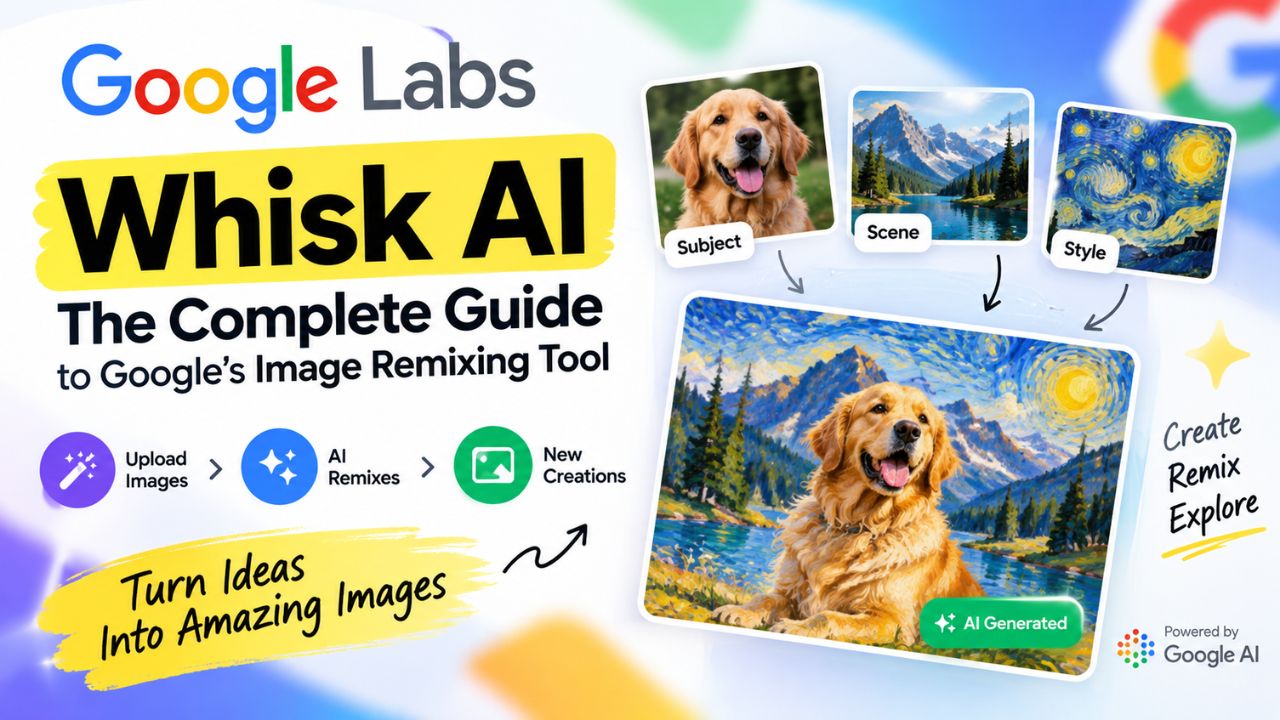
Whisk AI takes a different route. Built by Google Labs, Whisk lets you prompt with images instead of text. You drop in a picture for your subject, one for the scene, and one for the style. Whisk analyses all three and generates something new by remixing their visual essence. No prompt engineering. No wrestling with adjectives. Just visual input, visual output.
This complete guide explains what Whisk AI actually does, how it works under the hood, and where it fits into a creative workflow. Whether you're a designer exploring concepts or someone who has never touched an AI image tool before, you'll finish with a clear understanding of what Whisk is good at and what it isn't.
- What Is Whisk AI?
- Why Whisk AI Matters
- How Whisk AI Works
- Key Features of Whisk AI
- Whisk AI vs Other AI Image Tools
- How to Use Whisk AI: Step-by-Step
- Common Mistakes to Avoid
- Best Practices for Better Results
- Who Should Use Whisk AI?
- Who Should Avoid Whisk AI?
- Pros and Cons of Whisk AI
- Is Whisk AI Free? Pricing and Access
- The Future of Whisk AI
- Frequently Asked Questions
- Conclusion
What Is Whisk AI?
Whisk AI is an experimental image generation tool developed by Google Labs. It launched in December 2024 as part of Google's ongoing exploration into generative AI. The core idea is straightforward: instead of writing a text prompt to describe what you want, you upload reference images and let the tool figure out the rest.
Whisk uses three separate input slots — subject, scene, and style. You provide an image for each one. The subject slot is for your main focal point: a person, an object, an animal, or a character. The scene slot sets the environment or background. The style slot determines the artistic treatment, whether that's a painting, a sketch, a photograph, a 3D render, or something else entirely. Whisk then blends these visual elements into a new creation.
What makes Whisk distinctive is its approach to prompting. Traditional AI image generators like Midjourney and DALL·E require you to describe what you want in words. Whisk flips that. You show what you want visually, and the tool handles the translation into a text prompt automatically. It's less like writing a brief and more like assembling a mood board.
Whisk is explicitly labelled as a creative tool for rapid visual exploration, not a professional image editor. Google describes it as a way to "remix" ideas and iterate quickly, not a tool for pixel-perfect edits. That framing matters because it sets expectations about what Whisk is designed to do — and what it isn't.
Why Whisk AI Matters
AI image generation has exploded in recent years, but it still has a steep learning curve. Writing effective prompts is a skill. You need to know how to describe lighting, composition, camera angles, artistic styles, and subject details in a way the model understands. Many people find that frustrating.
Whisk AI lowers that barrier. If you can find an image that looks like what you want, you can use it as a reference. You don't need to know the phrase "golden hour lighting" or "isometric perspective." You just need a picture that demonstrates it.
This matters for several reasons:
- Accessibility: People without prompt-writing experience can still create complex, styled images.
- Speed: Visual referencing is often faster than describing a scene in words.
- Creative exploration: Whisk encourages remixing and iteration, which is how many creative ideas actually develop.
- Visual thinking: Some people think in images, not words. Whisk meets them where they are.
It also represents a broader shift in how humans interact with AI. Instead of learning the machine's language, we're seeing tools that adapt to ours — whether that's text, images, or a combination of both.
How Whisk AI Works
Behind the simple three-slot interface, Whisk runs a two-step process using two of Google's most capable AI models.
First, when you upload your subject, scene, and style images, the Gemini model analyses each one and writes a detailed text description. It captures the subject's features, the scene's atmosphere, and the style's visual characteristics. Think of it as Gemini looking at your images and describing what it sees in the kind of language an image generation model understands.
Second, that description — the text prompt Gemini created — is fed into Imagen 3, Google's image generation model. Imagen 3 produces the final image based on that prompt. You never had to write the prompt yourself, but one was created on your behalf.
Here's the important part: Whisk captures the essence of your reference images, not an exact replica. If you upload a photo of your friend, Whisk doesn't reproduce your friend's exact face. It generates a subject that shares some characteristics — a similar build, a similar hairstyle, a similar vibe — but it will differ from your reference in ways you can't fully control. The height might change. The skin tone might shift. The hairstyle might be different.
This isn't a bug. It's a deliberate design choice. Whisk is built for remixing and exploring, not copying. If you need exact replication, Whisk is the wrong tool. If you want to explore variations on an idea, it's exactly right.
What makes this approachable is that Whisk shows you the text prompt Gemini generated. You can read it, and you can edit it. If the generated image isn't quite right, you can tweak the underlying prompt — adding details, adjusting lighting, removing unwanted elements — and regenerate. It gives you a way to guide the tool without having to start from scratch.
Key Features of Whisk AI
Whisk AI is still experimental, but it already has a focused set of features that make it useful for fast visual ideation.
Image-Based Prompting
The headline feature. Instead of typing a prompt, you upload images. Whisk handles the prompt creation automatically. It's ideal for people who think visually or who find prompt writing tedious.
Three-Slot Remixing
Subject, scene, and style are separated into distinct input slots. This gives you some control over which elements combine, even if the final blend is unpredictable. You can experiment by changing one slot at a time and seeing how it affects the output.
Basic and Advanced Modes
Whisk offers two ways to create. Basic mode is for speed — you upload an image, pick a built-in style like Sticker or Plushie, and get a result instantly. Advanced mode gives you separate control over subject, scene, and style for more nuanced remixing.
Built on Gemini and Imagen 3
Whisk uses Gemini to analyse your images and write the prompt, then Imagen 3 to generate the final output. This combination produces detailed, high-quality images with good lighting and composition.
Editable Text Prompt
After Whisk generates its interpretation, you can view the text prompt it created. Editing that prompt lets you fine-tune the output — adjusting details, mood, or specific elements — without starting over.
Built-In Style Presets
Whisk includes six built-in styles: Sticker, Plushie, Capsule Toy, Enamel Pin, Chocolate Box, and Card. These are quick starting points for turning a subject into a specific visual format, like a sticker or a collectible figurine.
Whisk Animate
Whisk also includes a feature called Whisk Animate, which lets you transform generated images into short videos using Google's Veo model. Users in supported countries can generate a limited number of free videos each month, with higher limits for Google AI Pro and Ultra subscribers.
Whisk AI vs Other AI Image Tools
Whisk isn't trying to replace Midjourney or DALL·E. It solves a different problem. Here's how it compares to some of the most widely used AI image generators.
| Feature | Whisk AI | Midjourney | DALL·E 3 |
|---|---|---|---|
| Primary Input | Images | Text prompts | Text prompts |
| Prompt Writing Required | Minimal | High | Moderate |
| Style Control | Via reference image | Via text and parameters | Via text |
| Best For | Visual remixing, mood boarding | High-quality artistic images | Quick, integrated image generation |
| Free Access | Yes, with limits | No | Limited free use via ChatGPT |
| Output Consistency | Experimental | High with practice | Moderate to high |
| Exact Replication | No | No | No |
The key difference is intent. Whisk is designed for exploration and remixing. Midjourney and DALL·E are designed for producing specific, prompt-driven images. If you know exactly what you want and can describe it precisely, traditional text-to-image tools give you more control. If you're not sure what you want yet and prefer to work visually, Whisk is more approachable.
Whisk also differs in how it handles output. Because it captures essence rather than replicating exactly, the results are often unexpected. That's a feature for brainstorming but a limitation for production work. Midjourney, with a well-crafted prompt, can produce more consistent and predictable results.
How to Use Whisk AI: Step-by-Step
Getting started with Whisk is straightforward. Here's the process.
- Go to Google Labs and open Whisk. You'll need to sign in with your Google account. Whisk runs entirely in your browser, so there's nothing to download or install.
- Choose your subject image. Upload a photo or select one from the provided options. This is the main element you want in the final image. A clear, single-subject image works best.
- Choose your scene image. This sets the background and environment. It could be a landscape, an interior, or an abstract setting. The scene shapes the overall mood and context.
- Choose your style image. This determines the artistic treatment. A watercolour painting, a cinematic photograph, a pencil sketch — whatever look you're after.
- Click generate. Whisk will analyse the images and produce a result. It usually generates a few variations so you can compare options.
- Review and refine. If the output isn't quite right, you can adjust the input images, edit the generated text prompt, or try different combinations. Iteration is part of the process.
- Download or share. Once you're happy with a result, download it or save it to Google Drive.
The whole process takes a few minutes. Most of the time is spent choosing the right reference images, which is where the quality of your output is determined.
Common Mistakes to Avoid
Whisk behaves differently from other AI image tools. These are the mistakes that trip people up most often.
Expecting Exact Replication
Whisk doesn't copy and paste your input images. It interprets them. If you upload a photo of your dog and expect the output to look exactly like your dog, you'll be disappointed. Whisk captures the essence, not the exact details. The generated subject might have a different height, weight, hairstyle, or skin tone than your reference.
Using Low-Quality Reference Images
Blurry, low-resolution, or cluttered reference images lead to messy outputs. Use clear, well-lit images with a single dominant subject. The cleaner your inputs, the cleaner your results.
Overloading the Subject Slot
If your subject image contains multiple people, objects, or animals, Whisk may get confused about what to focus on. Simpler is better. One clear subject gives the tool a clearer signal.
Ignoring the Generated Text Prompt
Whisk creates a text prompt based on your images and shows it to you. If the output isn't right, reading and editing that prompt can help you understand what the AI "saw" and guide it in a better direction. It's a useful feedback loop that many people overlook.
Expecting Commercial-Grade Consistency
Whisk is not a production tool. It's for ideation and exploration. If you need consistent, brand-safe images for a client project, you'll likely need to use a different tool or refine the output further in editing software. Google itself describes Whisk as a tool for "rapid visual exploration, not pixel-perfect edits."
Best Practices for Better Results
These practices will help you get more usable images from Whisk AI.
- Use simple, clear reference images. One subject, one scene, one style. Avoid images with too many competing elements.
- Match aspect ratios where possible. If your subject image is square and your scene is wide, the blend can feel awkward. Similar proportions tend to produce cleaner results.
- Experiment with combinations. Try the same subject with different scenes and styles. The variations often reveal unexpected directions you wouldn't have thought of.
- Edit the text prompt. After generating, look at the prompt Whisk created. Small changes — like specifying a colour or removing an unwanted element — can improve the next generation.
- Iterate quickly. Don't spend too long perfecting one combination. Generate several options, then refine the most promising one.
- Treat outputs as starting points. Whisk is a creative spark, not a finished product. Treat its outputs as rough drafts you can refine further in other tools.
Who Should Use Whisk AI?
Whisk is particularly useful for:
- Designers and illustrators exploring mood boards and visual concepts without writing detailed prompts.
- Content creators looking for unique imagery who don't want to learn prompt engineering.
- Marketers and social media managers who need quick visual ideas for campaigns or posts.
- Writers and storytellers visualising characters, settings, or scenes for their work.
- Hobbyists and curious learners who want to experiment with AI image tools without a steep learning curve.
If your work involves visual thinking, brainstorming, or rapid iteration, Whisk can fit into your workflow as a fast ideation tool. It's especially valuable when you have a reference image in mind but can't quite articulate what you want in words.
Who Should Avoid Whisk AI?
Whisk may not be the right tool if:
- You need precise, repeatable results. Whisk's outputs vary, and exact replication is not its strength.
- You require commercial licensing guarantees. As an experimental Google Labs tool, its terms and output usage rights may not suit commercial projects. Check Google's current terms before using outputs commercially.
- You need high-resolution, print-ready images. Whisk's outputs are typically suited for digital use, not large-format printing.
- You want full control over every detail. Text-to-image tools with advanced parameters give you more granular control over composition, lighting, and specific elements.
- You're working on a tight deadline with no room for experimentation. Whisk is for exploration, not production-line efficiency.
Pros and Cons of Whisk AI
| Pros | Cons |
|---|---|
| No prompt writing required | Outputs can be unpredictable |
| Fast visual ideation | Not suitable for precise replication |
| Free to use via Google Labs | Usage limits apply |
| Built on Gemini and Imagen 3 | Experimental status means features may change |
| Easy for beginners | Limited control compared to advanced tools |
| Encourages creative remixing | May struggle with complex subjects |
| Includes Whisk Animate for video generation | Video generation limited by subscription tier |
Is Whisk AI Free? Pricing and Access
Whisk AI is free to use. It's available through Google Labs, and you only need a Google account to sign in. There's no subscription, no credit card, and no paywall.
That said, free doesn't mean unlimited. Google Labs tools typically come with usage caps to manage demand. If you hit the limit, you may need to wait before generating more images. The exact limits can change, especially since Whisk is experimental. Whisk Animate, the video generation feature, has its own limits: users in supported countries can generate five free videos per month, with higher caps for Google AI Pro and Ultra subscribers.
For most casual users, the free access is more than enough to explore, experiment, and create a healthy number of images. If you're using Whisk heavily for professional work, you may eventually want a more robust paid tool — but for ideation and learning, Whisk's free tier is generous.
The Future of Whisk AI
Whisk is part of Google's broader push into AI-assisted creativity. It sits alongside tools like Imagen, Veo, and other Labs experiments that explore how AI can augment human imagination.
As of February 2026, Google merged Whisk and ImageFX into Google Flow, its unified AI creative studio. The standalone Whisk tool closed on April 30, 2026, and its functionality was folded into Flow. This suggests that Google sees visual remixing as a core part of its creative AI suite rather than a standalone experiment.
What's clear is that the underlying idea — visual prompting, remixing, and multimodal interaction — is here to stay. As AI models get better at understanding images, tools like Whisk will likely become more precise, more controllable, and more integrated into creative workflows. For now, Whisk offers an early glimpse of a future where you don't need to be a prompt engineer to create compelling visuals. You just need a few good reference images and a willingness to experiment.
Frequently Asked Questions
What is Whisk AI used for?
Whisk AI is used for visual remixing and creative exploration. You provide a subject, scene, and style image, and it generates a new image that blends those elements. It's ideal for mood boarding, concept design, and quick visual ideation without writing prompts.
Is Whisk AI completely free?
Yes, Whisk AI is free to use through Google Labs. You only need a Google account. However, usage limits apply, and the tool is experimental, so features and access may change over time. Whisk Animate has separate monthly limits.
Does Whisk AI require prompt writing?
No. Whisk uses images as its primary input. You upload reference images for subject, scene, and style, and the tool generates a text prompt automatically. You can edit that prompt if you want more control over the output.
Can I use Whisk AI images commercially?
Since Whisk is an experimental Google Labs tool, you should check Google's current terms of service before using its outputs for commercial purposes. The safest approach is to treat Whisk images as concept references rather than final commercial assets.
How is Whisk AI different from Midjourney?
Midjourney is text-prompt driven and designed for high-quality, controllable image generation. Whisk is image-driven and built for remixing and exploration. Midjourney gives you more precision; Whisk gives you more speed and visual intuitiveness.
What model does Whisk AI use?
Whisk uses Google's Gemini model to analyse input images and write a text description, then feeds that description into Imagen 3, Google's image generation model, to produce the final output.
Can Whisk AI copy an exact image?
No. Whisk interprets and remixes visual elements. It does not replicate images exactly. The generated subject may differ in height, weight, hairstyle, or skin tone from your reference. If you need precise copying or editing, you'll need a different tool.
Is Whisk AI available in India?
Whisk was available through Google Labs to users with a Google account in supported regions. However, the standalone tool closed in April 2026 and was folded into Google Flow. Check Google Labs or Google Flow for current availability in your region.
What are the limitations of Whisk AI?
Whisk can be unpredictable, struggles with complex subjects, and isn't designed for precise, repeatable, or commercial-grade outputs. It's an experimental tool best used for ideation and creative exploration, not production work.
Will Whisk AI replace other AI image generators?
No. Whisk solves a different problem. It's a visual remixing tool, not a replacement for text-to-image generators like Midjourney or DALL·E. Different tools suit different workflows, and Whisk is best seen as a complementary creative aid.
Conclusion
Whisk AI isn't trying to be the most powerful image generator on the market. It's trying to be the most approachable one. By letting you work with images instead of words, it removes the biggest barrier many people face when experimenting with AI art: not knowing what to type.
It's free, it's fast, and it's genuinely useful for brainstorming. But it's also experimental. The outputs can be messy, the controls are limited, and it's not built for production work. That's fine. Whisk isn't a replacement for your existing design tools — it's a way to generate ideas before you open them.
If you're curious, give it a try. Upload a subject, pick a scene, choose a style, and see what happens. You might be surprised by what the combination reveals. And if the first result isn't perfect, iterate. That's the whole point.