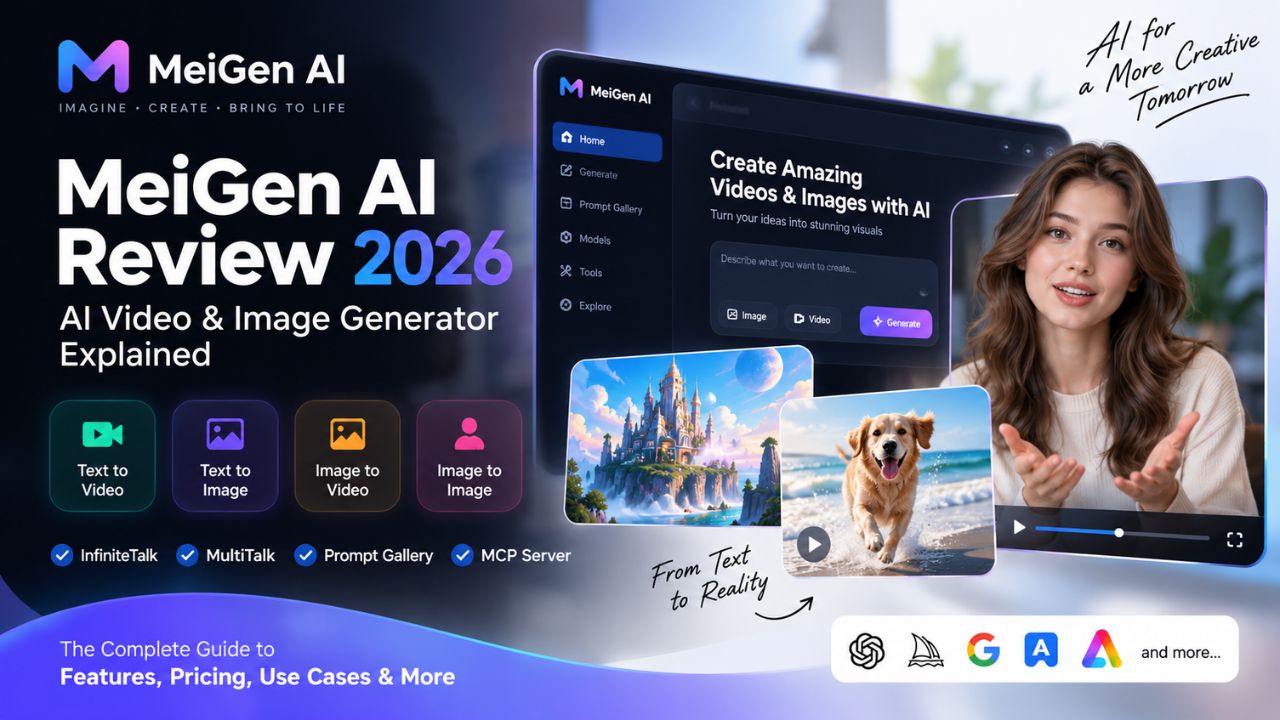
MeiGen AI Review: Features, Pricing, How to Use & AI Video Generation Guide
Introduction
MeiGen AI has emerged as one of the more technically ambitious platforms in the generative AI space, combining a curated prompt gallery, multi-model image and video generation, and open-source contributions to audio-driven video technology. Unlike single-model wrappers that lock users into one engine, MeiGen positions itself as an aggregator—routing requests to various AI models while also developing its own open-source frameworks for human-like video generation.
This review examines what MeiGen AI actually offers, based on information from the platform's official documentation, its open-source repositories on Hugging Face and GitHub, and publicly available product information. We'll cover verified features, current pricing structure, practical use cases, and how it compares to alternatives—without inflated claims or unsupported statistics.
Disclosure: This review is based on documented product information and publicly available sources. Individual results may vary. Pricing and features can change—always verify current details on MeiGen AI's official website before subscribing.
Quick Verdict
MeiGen AI is worth considering if you want: A platform that combines prompt discovery with multi-model generation, open-source talking-video technology, and developer-oriented tools like an MCP server for IDE integration.
Look elsewhere if you need: Deep image editing capabilities, real-time generation, or a platform focused exclusively on high-end cinematic video production.
The platform's strengths lie in its curated gallery (which shows real prompt-output pairs), its open-source InfiniteTalk and MultiTalk models for lip-sync and conversational video, and its unusual MCP server that brings design generation into coding environments. Its limitations include a sample-sized free tier and credit consumption that escalates quickly with video generation.
What Is MeiGen AI?
MeiGen AI is a creative platform that combines three main components:
- A curated prompt gallery — Browse prompts with their actual outputs, organized by category, with search by text, image, or color.
- A multi-model generation interface — Route image and video requests to different AI models from a single interface.
- Open-source video models — InfiniteTalk and MultiTalk, developed by the MeiGen team and released on Hugging Face and GitHub under permissive licenses.
The platform is accessible via web browser, with iOS and Android apps also available. A free tier allows browsing and limited generation before committing credits.
According to MeiGen's official documentation, the platform supports integration with local ComfyUI instances, allowing users to run generation workflows on their own hardware.
Official website: MeiGen AI
How MeiGen AI Works
MeiGen operates on a credit-based system. Here's the general workflow:
- Browse or search the gallery — No account required to view prompts and their outputs.
- Select a prompt or write your own — Use the gallery for inspiration or start from scratch.
- Choose a generation mode — Image or video, depending on your needs.
- Configure available settings — Model selection, aspect ratio, and other parameters vary by generation type.
- Generate — Credits are consumed based on the model and output type.
- Review and iterate — Download results or refine your prompt and regenerate.
For talking-video generation, the workflow involves uploading a reference image or video, providing an audio track, and letting InfiniteTalk or MultiTalk handle lip synchronization and motion.
Key Features
1. AI Image Generation
MeiGen supports multiple image generation models through its interface. According to the platform's documentation, supported models include GPT Image, Flux, and other leading engines. The exact model lineup may change, so check the current interface for available options.
Image generation supports various aspect ratios and can produce outputs suitable for social media, product mockups, and concept art.
2. AI Video Generation
Video generation is available through models including Seedance and Veo, according to MeiGen's documentation. Video generation consumes credits faster than image generation, and output length and resolution depend on the selected model.
3. Image-to-Video
The platform supports animating still images into video. This is particularly relevant for character animation and bringing portraits to life.
4. Text-to-Video
Text-to-video generation is available through supported video models. Results vary by model, and complex scenes may require iteration.
5. Character/Face Consistency
MeiGen's InfiniteTalk and MultiTalk models are specifically designed for human video generation with consistent facial features across frames. These are open-source models available on Hugging Face.
- InfiniteTalk: Supports unlimited-length talking video generation with lip sync and body motion alignment. Resolution up to 720p according to the model documentation.
- MultiTalk: Supports multi-person conversational video generation from reference images and audio tracks.
Both models are released under Apache 2.0 licenses, meaning they can be used, modified, and distributed freely.
6. Lip-Sync and Talking Video Features
The InfiniteTalk and MultiTalk models handle audio-driven video generation. According to the official model documentation:
- Input: Reference image or video + audio track
- Output: Video with synchronized lip movements and natural head/body motion
- Use cases: Dubbing, virtual avatars, conversational content
These models are available both through MeiGen's platform and as standalone downloads from Hugging Face.
7. AI Models / Model Selection
MeiGen acts as a multi-model aggregator. The available models may include:
- GPT Image (OpenAI)
- Flux (Black Forest Labs)
- Seedance
- Veo (Google)
- Other models as partnerships evolve
The exact lineup changes over time. Check the current generation interface for available options.
8. Editing and Creative Workflows
MeiGen is primarily a generation platform rather than a full editing suite. It does not offer the deep editing capabilities found in tools like Photoshop or dedicated AI editing platforms.
One notable feature is PNG-to-SVG vectorization, which converts generated raster images into scalable vector graphics—useful for logos and icons.
9. Export and Download Options
Generated images and videos can be downloaded directly from the platform. Export formats depend on the generation type. Check the current interface for available download options.
MeiGen AI Pricing
MeiGen operates on a credit-based system. Based on the platform's official pricing page (as of September 2026):
| Plan | Price | Credits | Key Details |
|---|---|---|---|
| Free | $0 | Daily credit allocation | Limited resolution, single concurrent task |
| Starter Credit Pack | $9.90 | One-time credit pack | Higher resolution, more concurrent tasks |
| Pro Credit Pack | $19.90 | Larger credit pack | Higher resolution, most popular tier |
Important notes:
- Credit packs are permanent and do not expire according to the platform.
- Failed generations are refunded.
- The free tier resets daily.
- Video generation consumes credits significantly faster than image generation.
- Commercial use rights depend on the plan—check the terms of service.
Pricing can change. Always verify current pricing on MeiGen AI's official pricing page before subscribing.
How to Use MeiGen AI
Step 1: Visit MeiGen AI
Go to MeiGen AI's official website. Be aware that multiple look-alike domains may exist—use the official URL.
Step 2: Create or Sign Into an Account
You can browse the gallery without an account. Sign-in is required to generate.
Step 3: Choose Your Tool
Select image generation, video generation, or talking-video generation depending on your goal.
Step 4: Enter a Prompt
Use a prompt from the gallery or write your own. The gallery shows real outputs, which helps set expectations.
Step 5: Configure Settings
Available settings vary by generation type. Options may include model selection, aspect ratio, and resolution.
Step 6: Generate
Press the generate button. Credits are consumed based on the model and output type.
Step 7: Review the Output
Check the result for prompt adherence and quality.
Step 8: Regenerate or Refine
Adjust your prompt or settings and generate again if needed.
Step 9: Download
Export your final image or video.
Original Prompt Examples
A. AI Image Prompt (Portrait)
Prompt: "Environmental portrait of a ceramic artist in her studio, natural window light from the left, shallow depth of field, hands covered in clay, warm earth tones, 85mm lens perspective, documentary style"
Why it works: Specifies subject, setting, lighting direction, lens type, and style—giving the model clear constraints.
B. Cinematic Image Prompt
Prompt: "Wide establishing shot of a rain-slicked Tokyo alley at night, neon signs reflecting in puddles, steam rising from vents, lone figure with umbrella in mid-distance, anamorphic lens flare, moody blue and magenta color grade"
Why it works: Combines location, weather, lighting, color palette, and camera characteristics for a cohesive cinematic look.
C. Product Image Prompt
Prompt: "Minimalist product shot of a matte black wireless earbud case on white marble surface, soft diffused overhead lighting, subtle reflection, negative space on right side for text, commercial photography style"
Why it works: Specifies product, surface, lighting, composition (negative space), and commercial context.
D. Character Image Prompt
Prompt: "Full-body character design of a desert nomad, layered linen wraps in sand and rust colors, weathered face, carrying copper water vessel, standing pose, neutral background, concept art style with clean linework"
Why it works: Describes clothing, color palette, physical details, pose, background, and artistic style.
E. Image-to-Video Prompt
Prompt: "Gentle camera push-in on the subject's face, subtle head turn toward camera, natural blinking, soft ambient movement in background fabric"
Why it works: Focuses on specific, achievable motion rather than complex scene changes.
F. Text-to-Video Prompt
Prompt: "Slow dolly shot through a sunlit forest canopy, dust particles floating in light beams, camera tilts down to reveal a moss-covered stone path"
Why it works: Describes camera movement, lighting conditions, atmospheric details, and a clear visual progression.
G. Talking Character Prompt (if using InfiniteTalk)
Prompt: Upload a portrait image + audio track. The model handles lip sync and motion automatically. For best results, use a clear, front-facing portrait with neutral expression.
Who Can Use MeiGen AI?
Content creators: Generate thumbnails, social media visuals, and short video content.
YouTubers: Create B-roll, concept visuals, and talking-head content from still images.
Social media managers: Produce platform-specific assets quickly.
Marketing teams: Generate ad creatives and promotional visuals for testing.
Small businesses: Create product imagery and brand assets without a full design team.
E-commerce brands: Generate product mockups and lifestyle imagery.
Designers: Use the prompt gallery for inspiration and the vectorization feature for logo concepts.
Video editors: Generate B-roll and supporting visuals.
Educators: Create talking-head explainer videos from portraits.
Agencies: Prototype concepts rapidly before full production.
Note: MeiGen is not suitable for every use case. It is a generation tool, not a full production suite.
MeiGen AI Pros and Cons
Pros
- Open-source video models: InfiniteTalk and MultiTalk are freely available on Hugging Face and GitHub under Apache 2.0 licenses.
- Curated prompt gallery: Prompts are paired with their actual outputs, providing realistic expectations.
- Multi-model access: Generate with different AI models from one interface.
- MCP server for developers: Integrate design generation into coding environments like Cursor and Claude Code.
- Local ComfyUI support: Run workflows on your own hardware for privacy and unlimited generation.
- Permanent credit packs: Credits do not expire according to the platform.
- Free tier available: Allows testing before committing credits.
Cons
- Free tier is limited: Daily credits cover only a small number of images; video consumes credits quickly.
- Video costs escalate: Premium video models consume credits rapidly.
- Not a full editor: Lacks deep editing capabilities of dedicated tools.
- Learning curve for advanced features: MCP server and ComfyUI integration require technical knowledge.
- Domain confusion: Multiple look-alike domains exist; use only the official site.
- No real-time generation: Unlike some competitors, generation is not instantaneous.
MeiGen AI vs Other AI Tools
| Tool | Image | Video | Image-to-Video | Ease of Use | Free Access | Best For |
|---|---|---|---|---|---|---|
| MeiGen AI | Yes | Yes | Yes | Moderate | Limited free tier | Multi-model generation + open-source talking video |
| OpenArt | Yes | Limited | Yes | Easy | Limited | Character consistency and editing |
| Krea | Yes | Yes | Yes | Easy | Limited | Real-time generation and LoRA training |
| Pollo AI | Yes | Yes | Yes | Easy | Limited | Video-focused workflows |
| Runway | Yes | Yes | Yes | Moderate | Limited | Professional video editing |
| Kling | No | Yes | Yes | Easy | Limited | High-quality video generation |
Note: Feature availability changes frequently. Verify current capabilities on each platform's official documentation.
Key takeaways:
- MeiGen is better for users who want multiple models in one place, open-source talking-video technology, and developer integrations.
- OpenArt is better for consistent character workflows and editing depth.
- Krea is better for real-time experimentation and LoRA training.
- Pollo AI is better for users focused primarily on video generation.
- Runway is better for professional video editing and production workflows.
Who Should Use MeiGen AI?
MeiGen may be a good fit if you:
- Want to explore multiple AI models without managing multiple subscriptions.
- Need talking-video generation with lip sync for avatars or dubbing.
- Are a developer who wants design generation inside your IDE.
- Value open-source tools and local GPU support.
- Want to browse real prompt-output examples before generating.
Who May Want an Alternative?
Consider other options if you:
- Need deep image editing and compositing.
- Want real-time generation for live experimentation.
- Focus exclusively on high-end cinematic video production.
- Prefer a single, specialized model over a multi-model platform.
- Need extensive character consistency across many images (OpenArt may be better).
Final Verdict: Is MeiGen AI Worth Using?
What MeiGen does well:
- Combines prompt discovery with generation in a single interface.
- Offers open-source talking-video models that are genuinely innovative.
- Provides developer tools like the MCP server for IDE integration.
- Allows local ComfyUI integration for privacy and unlimited generation.
Where it falls short:
- Free tier is a sample, not a full experience.
- Video generation consumes credits quickly.
- Not a full editing suite.
- Advanced features require technical knowledge.
Who should try it:
- Creators who want to explore multiple models without multiple subscriptions.
- Developers interested in design generation within coding environments.
- Anyone curious about open-source talking-video technology.
Who should compare alternatives first:
- Users who need deep editing capabilities.
- Those who want real-time generation.
- Professionals focused exclusively on cinematic video production.
Before paying, check:
- Current pricing and credit costs on the official MeiGen AI pricing page.
- Terms of service for commercial use rights.
- Current model availability, as the lineup may change.
The free tier allows testing without commitment. For users who need the specific combination of features MeiGen offers, it's worth exploring.
FAQ
What is MeiGen AI?
MeiGen AI is a creative platform combining a prompt gallery, multi-model image and video generation, and open-source talking-video models (InfiniteTalk and MultiTalk).
Is MeiGen AI free?
There is a free tier with daily credits. Paid credit packs are also available.
Does MeiGen AI generate videos?
Yes, through supported video models. Video generation consumes credits faster than image generation.
Can MeiGen AI generate images?
Yes, through supported image models.
Does MeiGen AI support image-to-video?
Yes, this is a core capability.
Does MeiGen AI offer lip-sync?
Yes, through the InfiniteTalk and MultiTalk models.
How much does MeiGen AI cost?
Pricing starts with a free tier. Paid credit packs start at $9.90 according to the platform's pricing page. Verify current pricing on the official MeiGen AI pricing page.
Is MeiGen AI suitable for beginners?
The basic generation workflow is accessible. Advanced features like MCP server and ComfyUI integration require technical knowledge.
Can I use MeiGen AI for commercial projects?
Commercial use rights depend on your plan. Check the terms of service.
What are the alternatives to MeiGen AI?
Alternatives include OpenArt, Krea, Pollo AI, Runway, and Kling, depending on your specific needs.
Are MeiGen AI credits required?
Yes, generation consumes credits. The free tier provides limited daily credits.
Does MeiGen AI have an API?
MeiGen offers an MCP server for developer integration. Check official documentation for current API availability.
About This Review
Review date: September 13, 2026
Last updated: September 13, 2026
Methodology: This review is based on information from MeiGen AI's official website and documentation, the official Hugging Face model pages for InfiniteTalk and MultiTalk, and publicly available product information. No hands-on testing was performed for this review; claims are attributed to official sources where applicable.
Sources checked:
- MeiGen AI Official Website
- InfiniteTalk on Hugging Face
- MultiTalk on Hugging Face
- Publicly available pricing and product information
Disclosure: This article does not contain affiliate links. If affiliate links are added in the future, this disclosure will be updated.