Kittl AI vs YupTees – Which AI Design Tool Wins in 2026?
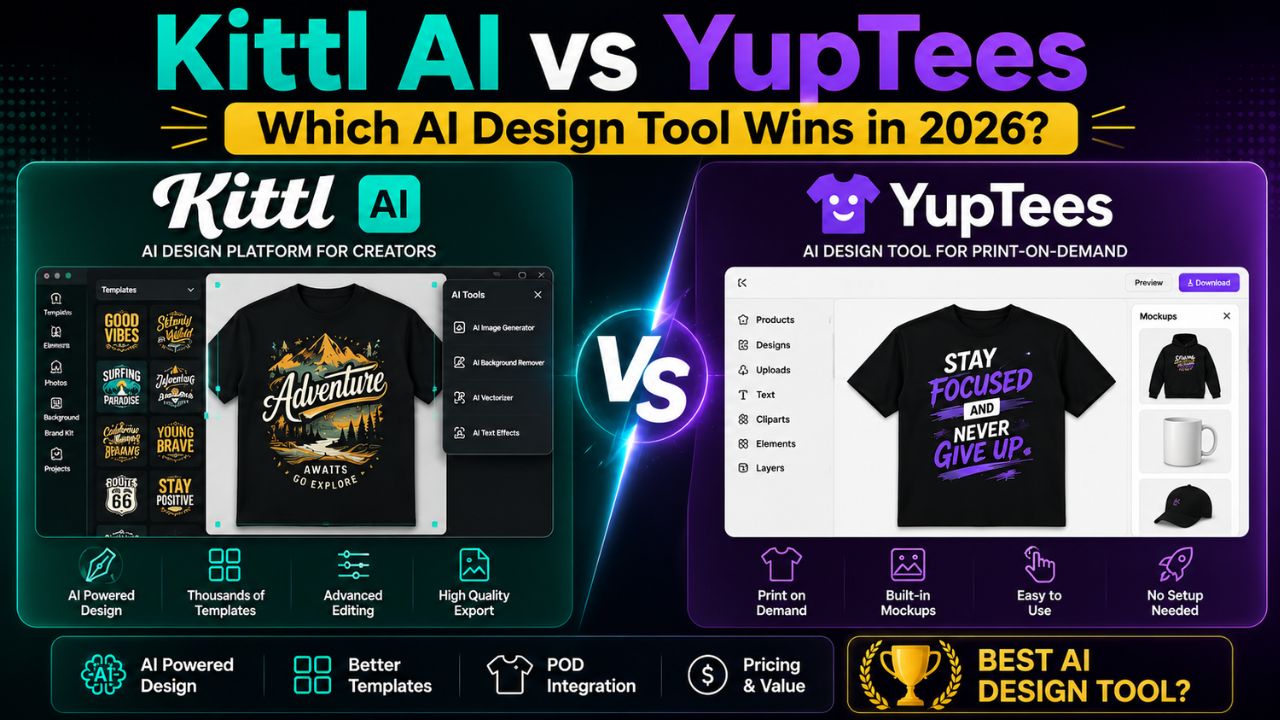
The rise of AI-powered design tools has transformed the way creators, entrepreneurs, and print‑on‑demand sellers bring ideas to life. Two platforms that have gained significant attention are Kittl and YupTees. Both harness artificial intelligence to simplify design, but they serve different audiences and workflows.
In this 3000+ word deep‑dive, we’ll compare Kittl AI and YupTees across every dimension: features, output quality, pricing, target users, ease of use, AI capabilities, integrations, and real‑world performance. By the end, you’ll know exactly which tool—or combination—fits your creative business.
Whether you’re a graphic designer, a POD seller, a branding agency, or a solopreneur, this comprehensive guide will help you decide. Let’s get started.
📑 Table of Contents
- 1. What is Kittl AI? – Overview
- 2. What is YupTees? – Overview
- 3. Core Philosophy & Target Audience
- 4. Feature Deep‑Dive Comparison
- 5. AI Capabilities – Text‑to‑Vector vs. POD‑Focused
- 6. Output Quality: Vector vs. Print‑Ready PNG
- 7. Ease of Use & Learning Curve
- 8. Templates, Assets & Library
- 9. Pricing & Plans Breakdown
- 10. Commercial License & Rights
- 11. Integrations & Workflow
- 12. Pros & Cons at a Glance
- 13. Best Use Cases for Each Platform
- 14. The Verdict – Which One Should You Choose?
- 15. Frequently Asked Questions
- 16. Conclusion & Final Thoughts
1. What is Kittl AI? – Overview
Kittl is a browser‑based design platform that leverages AI to help creators produce professional graphics quickly. Originally built for t‑shirt and merch designers, it has evolved into a full‑fledged design suite comparable to Canva or Adobe Express—but with a stronger focus on vector graphics, typography, and branding.
Kittl’s standout feature is its AI Vector Generator, which converts text prompts into editable SVG vectors. This is a game‑changer because vectors scale infinitely and are the industry standard for logo design, apparel, and illustration. Kittl also offers advanced text effects, mockups, and a rich library of templates.
Since its launch, Kittl has gained a loyal user base among designers, small agencies, and merch sellers who need both quality and speed. It’s a versatile tool that can handle everything from social media posts to complex brand identities.
2. What is YupTees? – Overview
YupTees is a specialised AI‑powered tool designed exclusively for print‑on‑demand (POD) sellers. Its mission is simple: help users generate high‑quality, print‑ready t‑shirt designs in seconds, without any design skills. YupTees focuses on affordability, speed, and production‑ready output.
The platform uses AI to create designs that are fully editable and delivered at a resolution of 4500x5400px with transparent backgrounds—perfect for uploading directly to POD platforms like Printful, Printify, or Merch by Amazon. Unlike Kittl, YupTees does not aim to be a general‑purpose design tool; it’s laser‑focused on the POD niche.
YupTees is relatively newer to the market but has carved out a space among budget‑conscious sellers who want a quick, no‑frills way to create shirt designs without paying for premium features they don’t need.
3. Core Philosophy & Target Audience
Kittl’s philosophy is to democratise professional graphic design by making vector‑based tools accessible and AI‑assisted. It targets a broad audience: graphic designers, branding specialists, marketing teams, content creators, and serious POD sellers who want full creative control. Kittl positions itself as a “professional‑grade Canva” for those who need more than just basic templates.
YupTees’ philosophy is hyper‑specialisation. It targets one persona: the print‑on‑demand entrepreneur who wants to produce many designs quickly, with minimal effort and cost. YupTees doesn’t try to be everything to everyone; it aims to be the best tool for one specific job—generating shirt designs that convert on marketplaces.
This difference in philosophy ripples through every feature, pricing decision, and user experience. Kittl is a Swiss Army knife; YupTees is a precision scalpel.
4. Feature Deep‑Dive Comparison
Let’s break down the core features of each platform side‑by‑side. While there is some overlap, the emphasis and execution are vastly different.
| Feature Category | Kittl AI | YupTees |
|---|---|---|
| AI Generator | Text‑to‑Vector (SVG), AI Image generation, AI text effects | AI shirt design generator (focus on POD themes) |
| Output Format | SVG, PNG, JPG, PDF (vectors & raster) | Print‑ready PNG with transparent background (4500x5400px) |
| Editing Capabilities | Full vector editing, layers, typography, masks, effects | Fully editable designs (but primarily on the generated output) |
| Templates | 10,000+ premium templates for multiple niches | Limited / not extensively advertised; focus on generation |
| Mockup Generator | Yes (integrated product mockups) | Not a primary feature (assumes you use POD platforms) |
| Brand Kits | Yes (on Expert plan and above) | No |
| Collaboration | Real‑time collaboration (Business plan) | No |
| Text Effects | Extensive (distressed, 3D, curved, glitch, etc.) | Basic text support (focus is on AI‑generated graphics) |
As the table shows, Kittl offers a much broader feature set, while YupTees focuses on doing one thing well: delivering high‑res POD designs.
5. AI Capabilities – Text‑to‑Vector vs. POD‑Focused
Kittl’s AI Vector Generator is its crown jewel. You type a prompt like “vintage rocket ship mascot” or “minimalist wolf head logo,” and Kittl generates an editable SVG vector in seconds. This is powered by a custom AI model trained on millions of vector assets. The results are often production‑ready, and you can tweak colours, shapes, and layers directly in the editor. Kittl also includes an AI Image Generator (raster) and AI‑powered text effects for quick stylisation.
YupTees’ AI is more specialised. It generates shirt designs based on prompts, but the output is a high‑resolution PNG rather than a vector. The AI understands POD trends—slogans, minimalist graphics, vintage styles—and produces files optimised for t‑shirt printing. While you can’t edit the underlying vector, you can customise the design elements, change colours, and add text.
Key difference: Kittl’s AI gives you a scalable, editable vector that you can use for any purpose (logos, posters, billboards). YupTees gives you a print‑ready raster file optimised for one specific use case: apparel.
6. Output Quality: Vector vs. Print‑Ready PNG
Kittl’s output is superior in terms of versatility and scalability. SVG vectors are resolution‑independent, meaning they look crisp on anything from a business card to a billboard. Kittl also allows high‑resolution PNG exports (up to 300 DPI) on paid plans. The vector quality is comparable to Adobe Illustrator, making it suitable for professional branding and packaging.
YupTees’ output is a 4500x5400px PNG at 300 DPI—exactly what you need for DTG (Direct‑to‑Garment) printing on platforms like Printful or Merch by Amazon. The transparent background saves you a step, and the resolution is industry‑standard. However, because it’s a raster file, you can’t scale it up beyond its native resolution without losing quality. For POD purposes, this is rarely an issue, but it limits use for other applications.
Winner for versatility: Kittl. Winner for POD‑ready workflow: YupTees (because it’s already at the correct specs).
7. Ease of Use & Learning Curve
Kittl has a moderate learning curve. While it’s more intuitive than professional tools like Illustrator, its vector editor includes layers, paths, and advanced typography that may overwhelm complete beginners. However, Kittl offers extensive tutorials, templates, and a clean interface that helps new users get started quickly. The AI generator lowers the barrier—you can generate a vector and then tweak it without knowing vector theory.
YupTees is designed for simplicity. You input a prompt, the AI generates a design, and you make minor adjustments before downloading. There’s almost no learning curve—anyone who can type a sentence can create a shirt design in under a minute. This is ideal for POD sellers who want to iterate rapidly without getting bogged down in design software.
Verdict: YupTees wins for sheer speed and ease, but Kittl offers more control for those willing to invest a little time.
8. Templates, Assets & Library
Kittl boasts a library of over 10,000 premium templates covering t‑shirts, logos, social media, posters, and more. It also provides 1+ million photos, graphics, and fonts, reducing the need for external stock assets. This makes Kittl a one‑stop‑shop for many projects. Templates are professionally designed and categorised by style and use case.
YupTees does not highlight a large template library. Its value proposition is AI generation, not pre‑made templates. While you can customise outputs, you won’t find a vast collection of ready‑to‑use designs. This isn’t a downside for its core audience, but it means you’re more reliant on the AI’s creativity.
Kittl is the clear winner if you value starting from a curated template.
9. Pricing & Plans Breakdown
Kittl uses a tiered subscription model:
- Free: $0/month – 20 projects, 20 one‑time AI credits, low‑res exports, commercial use with attribution.
- Pro: $10/month (billed annually) – 50 projects, 200 monthly AI tokens, 10GB storage, high‑res vector exports, full commercial license.
- Expert: $24/month (annually) – unlimited projects, 600 monthly AI tokens, brand kits, 100GB storage.
- Business: Custom pricing – team collaboration, admin features, advanced support.
YupTees pricing is not publicly detailed on its website at the time of writing, but the platform explicitly markets itself as “the most affordable” AI shirt design generator. Typically, POD‑focused tools offer lower entry prices or pay‑per‑use credits. For the most accurate and current pricing, you should visit the YupTees website directly.
Overall: Kittl offers a free tier for testing, while YupTees is positioned as a budget‑friendly option for high‑volume POD sellers. If you need vectors and versatility, Kittl provides excellent value for its price.
10. Commercial License & Rights
Kittl grants a full commercial license on all paid plans (Pro and above). You can sell your designs on merch, use them for branding, or incorporate them into products without attribution. The free plan also allows commercial use but requires attribution to Kittl. This is a generous policy that makes Kittl suitable for professional work.
YupTees produces print‑ready files explicitly for commercial POD use. It’s safe to assume that designs created on the platform can be sold on products, but you should always check the latest terms of service for any restrictions. Since YupTees targets POD sellers, commercial rights are central to its value.
Both tools allow commercial use, which is critical for anyone building a business around designs.
11. Integrations & Workflow
Kittl integrates with major POD platforms (Printful, Printify) via direct mockup sharing and export. It also supports downloading files for use in other tools. Kittl is a standalone design environment, so it’s less about connecting to other apps and more about replacing them. You can, however, export SVG files for use in Illustrator or Figma.
YupTees is designed for quick download and upload to POD platforms. It doesn’t emphasise third‑party integrations; instead, it focuses on the generation‑to‑download loop. This makes it a lightweight tool in your POD stack, not a central hub.
If you need a comprehensive design ecosystem, Kittl is stronger. If you just need a design generator that plugs into your existing POD workflow, YupTees fits.
12. Pros & Cons at a Glance
✅ Kittl AI – Pros
- Industry‑leading AI Vector Generator (editable SVGs).
- Extensive template and asset library (10k+ templates).
- Versatile – can design logos, social posts, packaging, etc.
- Full commercial license on paid plans.
- Collaboration and brand kits for teams.
- Free tier available for testing.
❌ Kittl AI – Cons
- Steeper learning curve than simpler POD tools.
- No dedicated POD‑specific output presets (you need to set dimensions).
- Pricing can add up for high‑volume users.
✅ YupTees – Pros
- Extremely easy and fast – generate designs in seconds.
- Print‑ready PNG output with perfect specs (4500x5400px, transparent).
- Advertised as the most affordable AI design tool for POD.
- Fully editable outputs.
- Laser‑focused on the POD niche – no unnecessary features.
❌ YupTees – Cons
- Limited to raster PNG output (no vectors).
- No large template library or advanced design tools.
- Not suitable for design work beyond apparel (logos, branding, etc.).
- Pricing information not fully transparent (check website).
13. Best Use Cases for Each Platform
Choose Kittl AI if you are:
- A graphic designer or illustrator who needs vector output.
- A branding agency creating logos, style guides, and marketing materials.
- A POD seller who wants full control over design elements and the ability to repurpose designs for other products (stickers, mugs, etc.).
- A content creator who needs social media graphics, thumbnails, and presentations alongside merch designs.
- A team that requires collaboration and brand consistency tools.
Choose YupTees if you are:
- A print‑on‑demand seller who needs to produce many shirt designs quickly and cheaply.
- Someone with no design experience who wants to start selling POD without a learning curve.
- A seller focused exclusively on apparel and not interested in other design formats.
- On a tight budget and looking for the most affordable dedicated POD design generator.
For many creators, the optimal strategy is to use both: Kittl for complex, vector‑based projects and YupTees for rapid POD experimentation and volume production.
14. The Verdict – Which One Should You Choose?
There is no single “winner” because Kittl AI and YupTees serve different purposes. However, based on your needs, one will clearly be a better fit:
- If you need versatility, vectors, and professional control → Kittl AI is your tool. It offers a comprehensive design suite that can handle any project, from POD to branding to social media. The AI vector generator is a standout feature that justifies the subscription.
- If you need speed, simplicity, and POD‑specific output → YupTees is your tool. It eliminates friction and gets you print‑ready files instantly. For high‑volume sellers, the efficiency gains can be massive.
For POD sellers with larger budgets and a desire for both quality and speed, using Kittl for premium designs and YupTees for rapid testing is a powerful combination. Ultimately, the best tool is the one that fits your workflow, budget, and creative ambitions.
15. Frequently Asked Questions
- Can I use Kittl designs for print‑on‑demand?
- Absolutely. Kittl’s paid plans include a full commercial license, and you can export high‑resolution PNGs or vectors suitable for POD.
- Does YupTees generate vector files?
- No. YupTees outputs high‑resolution PNG files with transparent backgrounds, which are print‑ready but not scalable vectors.
- Is Kittl better than Canva for t‑shirt design?
- For t‑shirt design specifically, Kittl offers superior vector tools and AI‑generated vectors, making it more powerful than Canva for apparel.
- How much does YupTees cost?
- YupTees promotes itself as the most affordable option, but specific pricing is not publicly listed. Check the official website for current plans.
- Can I edit Kittl AI vectors after generation?
- Yes, all vectors generated by Kittl are fully editable—you can change colours, shapes, layers, and add text or effects.
- Which tool is better for beginners?
- YupTees is easier for absolute beginners because it requires zero design knowledge. Kittl has a moderate learning curve but offers more long‑term value.
16. Conclusion & Final Thoughts
The AI design landscape is evolving rapidly, and both Kittl and YupTees represent exciting innovations—just in different corners of the market. Kittl empowers you to become a professional designer with vector capabilities and a vast creative toolkit. YupTees empowers you to become a productive POD seller with minimal effort and cost.
Your choice should align with your goals. If you’re building a brand, want to produce high‑quality logos and illustrations, and need designs that work across multiple media, Kittl is worth every rupee. If you’re focused on churning out POD shirts for Etsy, Amazon, or Redbubble, YupTees offers a streamlined, cost‑effective solution.
We recommend trying both—Kittl offers a free tier, and YupTees likely offers affordable trial options—to see which fits your creative rhythm. In many cases, they complement each other perfectly: use Kittl for your “hero” designs and YupTees for quick variations and testing.
Whichever you choose, AI is now an indispensable ally in design. Embrace it, experiment, and watch your creative output soar.