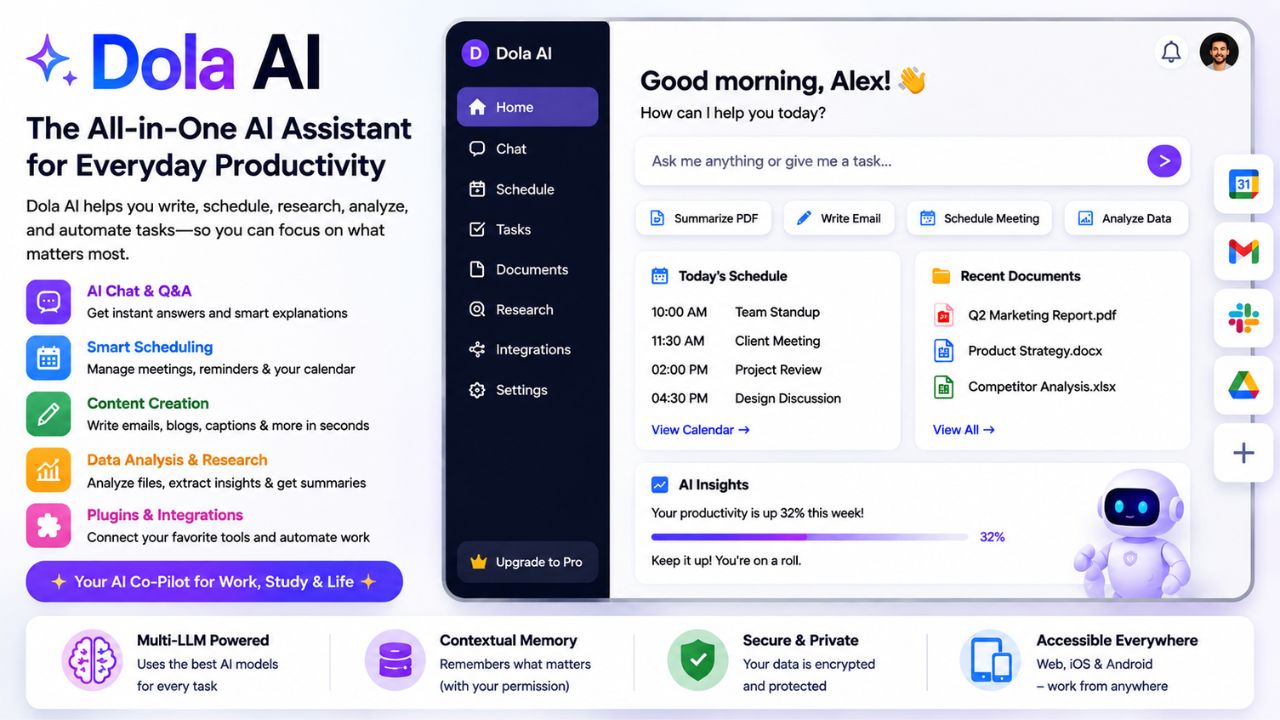
Dola AI – The All-in-One AI Assistant for Everyday Productivity
In the rapidly evolving landscape of artificial intelligence, a new wave of "everyday AI" tools is emerging. These are not just chatbots or image generators; they are digital companions designed to integrate seamlessly into your daily workflow. Among these, Dola AI is carving out a distinct niche.
Dola AI positions itself as a versatile, task-oriented AI assistant that goes beyond simple Q&A. It aims to be your personal productivity partner, helping with scheduling, research, content creation, and even casual conversation—all wrapped in a user-friendly interface.
But how does Dola AI stack up against the giants like ChatGPT, Claude, or even the privacy-focused Duck AI? Is it a worthy addition to your digital toolkit, or just another me-too product? In this comprehensive guide, we'll explore Dola AI's features, use cases, pricing, strengths, and weaknesses, and help you decide if it's the right AI assistant for you.
📑 Table of Contents
- 1. What is Dola AI? – An Overview
- 2. Core Features of Dola AI
- 3. How Dola AI Works: The Technology Behind It
- 4. Top Use Cases for Dola AI
- 5. Dola AI vs ChatGPT vs Claude vs Duck AI
- 6. Pros & Cons of Dola AI
- 7. Pricing & Plans
- 8. Security & Privacy
- 9. The Future of Dola AI
- 10. Frequently Asked Questions
- 11. Conclusion – Is Dola AI Right for You?
1. What is Dola AI? – An Overview
Dola AI is a multi-modal AI assistant that combines the capabilities of a large language model (LLM) with task-specific modules for scheduling, research, and content generation. Unlike single-purpose tools, Dola is designed to be a "swiss army knife" for everyday digital tasks.
It is accessible via a web app, with dedicated mobile apps for iOS and Android. The interface is clean and conversational, making it easy for both tech-savvy users and beginners to interact with.
Key Differentiators:
- Task Integration: Dola can connect to your calendar, email, and task lists to perform actions on your behalf.
- Contextual Memory: It retains context across sessions (with user permission) to provide more personalized assistance.
- Multi-LLM Backend: Dola doesn't rely on a single model; it routes queries to the best-performing model for the task (similar to Duck AI, but with less emphasis on anonymity).
2. Core Features of Dola AI
Dola AI packs a surprising number of features into its clean interface. Here are the standout ones:
- 🧠 Intelligent Chat & Q&A: Handles general knowledge queries, explanations, and brainstorming with a conversational tone. It can break down complex topics into easy-to-understand language.
- 📅 Smart Scheduling Assistant: Connect your Google or Outlook calendar. Dola can schedule meetings, set reminders, and even suggest optimal times based on your availability and preferences.
- ✍️ Content Creation & Editing: Draft emails, blog posts, social media captions, and more. It also offers tone adjustment (professional, casual, humorous) and text summarization.
- 📊 Data Analysis & Research: Dola can analyze uploaded documents (PDFs, spreadsheets) and extract key insights, trends, and summaries. It can also perform real-time web searches for the latest information.
- 🌐 Multilingual Support: Communicates fluently in dozens of languages, making it a valuable tool for international teams or travelers.
- 🔌 Plugin Ecosystem: Dola supports plugins for third-party apps like Slack, Trello, and Asana, extending its functionality beyond the core interface.
- 🔊 Voice Interaction: On mobile, you can interact with Dola using voice commands, making it hands-free and accessible.
3. How Dola AI Works: The Technology Behind It
Under the hood, Dola AI is a sophisticated orchestration layer that sits on top of multiple LLMs and APIs.
- Intent Recognition: When you send a message, Dola's proprietary classifier determines the intent (e.g., "schedule meeting," "write email," "answer question").
- Model Routing: Based on the intent, the query is routed to the most suitable LLM. For creative writing, it might use a model like Claude; for factual Q&A, it might use a fine-tuned version of Llama; for coding, it might route to a specialized code model.
- Action Execution: If the task involves an external app (e.g., adding a calendar event), Dola uses OAuth to securely connect to that service and perform the action.
- Response Generation: The final response is synthesized and delivered to you, often with options to edit, save, or share the result.
This modular architecture allows Dola to be flexible and adapt to new tasks without retraining the entire model from scratch.
4. Top Use Cases for Dola AI
Dola AI's versatility makes it useful across a wide range of professions and personal contexts:
- 👩💼 For Professionals: Draft and reply to emails, summarize meeting notes, manage your calendar, and prepare presentations.
- 📝 For Content Creators: Brainstorm article ideas, write outlines, generate social media posts, and refine your writing style.
- 🎓 For Students: Research topics, summarize textbooks, get help with homework, and organize study schedules.
- 🚀 For Entrepreneurs: Analyze market trends, create business plans, draft pitches, and manage customer communications.
- 🧑💻 For Developers: Generate boilerplate code, debug syntax errors, explain complex algorithms, and write documentation.
- 🏠 For Personal Use: Plan trips, create meal plans, get fitness advice, and have casual, engaging conversations.
5. Dola AI vs ChatGPT vs Claude vs Duck AI
How does Dola AI compare to the market leaders and the privacy-focused alternative? Here’s a breakdown:
| Feature | Dola AI | ChatGPT | Claude | Duck AI |
|---|---|---|---|---|
| Primary Focus | Task Automation & Productivity | Versatile Chatbot | Safe & Helpful AI | Privacy-First AI |
| Task Execution | ✅ (Calendar, Email, Tasks) | ⚠️ (Limited via plugins) | ❌ | ❌ |
| Context Memory | ✅ (Persistent) | ✅ (Within session) | ✅ (Large context) | ❌ (Ephemeral) |
| Multi-LLM Routing | ✅ | ❌ (Own models) | ❌ (Own models) | ✅ |
| Privacy | Standard (encrypted) | Standard (trains on data) | Strong (limited training) | Maximum (zero retention) |
| Pricing (Monthly) | $15 (Pro) | $25 (Plus) | $20 (Pro) | Free (Limited) |
| Mobile App | ✅ | ✅ | ✅ | ✅ (via DuckDuckGo) |
Key Takeaway: Dola AI is the most action-oriented of the bunch. If you want an AI that doesn't just talk but does things (like scheduling meetings or sending emails), Dola is a strong contender. ChatGPT and Claude are better for deep reasoning and creative writing, while Duck AI is the undisputed king of privacy.
6. Pros & Cons of Dola AI
✅ Advantages
- All-in-One Convenience: Combines chat, scheduling, writing, and research in one place.
- Task-Oriented: Can actually take actions on your behalf, saving you time.
- Intelligent Routing: Uses the best model for each task, potentially offering better results than a single model.
- Clean & Intuitive UI: Easy to navigate, even for non-technical users.
- Competitive Pricing: Lower entry price than ChatGPT Plus.
- Multi-Platform: Available on web, iOS, and Android.
❌ Disadvantages
- Less Established Ecosystem: Fewer plugins and integrations compared to ChatGPT.
- Privacy Trade-Off: Less anonymous than Duck AI; your data is used to improve the service (though policies are transparent).
- Contextual Limitations: While memory is persistent, the context window for any single conversation is not as large as Claude's.
- Reliance on External APIs: Dola's functionality is dependent on the reliability of third-party LLM providers and service APIs.
7. Pricing & Plans
As of 2026, Dola AI offers a freemium model:
- Free Plan: Includes 20 free queries per day, access to the core chat, and basic scheduling. Limited to a single calendar integration.
- Pro Plan ($15/month): Up to 200 queries per day, full task execution (email, advanced scheduling), priority access to new models, and a larger context window.
- Business Plan ($35/user/month): Team collaboration features, advanced admin controls, and dedicated support.
Annual subscriptions offer a 20% discount. There is also a 7-day free trial of the Pro plan.
8. Security & Privacy
Dola AI takes a balanced approach to privacy. The company states that:
- All data is encrypted in transit and at rest.
- Conversations are not used for training the underlying LLMs by default (though they may be used anonymously to improve Dola's routing algorithms).
- Users can opt-out of data collection in the privacy settings.
- OAuth tokens for calendar/email integrations are stored securely and used only for the intended actions.
This is a more conventional approach compared to Duck AI's extreme privacy, but it's still transparent and reasonable for most professional users. Always review the privacy policy on the official website for the most current information.
9. The Future of Dola AI
The AI landscape is changing rapidly, and Dola AI has an ambitious roadmap:
- Deeper Integrations: Expect native connections to CRM, project management, and design tools.
- Proactive Assistance: Moving from reactive to proactive—Dola might suggest actions before you ask.
- Enhanced Multimodality: Image and audio generation features are in development.
- Open-Source Modules: Dola plans to open-source some of its routing and integration components, fostering a community of developers.
If Dola executes on this vision, it could become a central hub for digital work, rivaling even established productivity suites.
10. Frequently Asked Questions
- What is Dola AI best used for?
- It's ideal for professionals and students who need an AI assistant that can handle scheduling, drafting content, and performing research in one place.
- Is Dola AI better than ChatGPT?
- It depends on your needs. For task execution and integration, yes. For deep creative writing or complex coding, ChatGPT (with its plugins) still holds an edge.
- Does Dola AI have a free version?
- Yes, a limited free plan is available with 20 queries per day.
- Is Dola AI secure?
- Yes, it uses standard encryption and clear data handling policies. It's less anonymous than Duck AI but more secure than many generic tools.
- Can Dola AI write code?
- Yes, it can generate and explain code in multiple programming languages.
- Does Dola AI support multiple languages?
- Yes, it supports dozens of languages for both input and output.
11. Conclusion – Is Dola AI Right for You?
Dola AI represents a compelling vision for the future of AI assistants—one that is integrated, proactive, and action-oriented. It's not the most powerful model for raw text generation (that prize likely still goes to ChatGPT or Claude), nor is it the most privacy-focused (that's Duck AI).
But if you're tired of juggling multiple apps for scheduling, writing, and research, and you want an AI that can actually do things for you, Dola AI is a strong and affordable choice.
Choose Dola AI if:
- You need an assistant that integrates with your calendar, email, and tasks.
- You want a clean, multi-platform app for everyday productivity.
- You prefer an affordable subscription with transparent privacy policies.
Consider alternatives if:
- Your primary need is deep, long-context creative writing (try Claude or ChatGPT).
- Absolute anonymity and zero data retention are non-negotiable (choose Duck AI).
- You rely heavily on a specific ecosystem (e.g., Google Workspace or Microsoft 365) that Dola doesn't yet fully support.
Dola AI is a promising tool that is rapidly evolving. If it fits your workflow, it could significantly boost your daily productivity. Give the free trial a go and see if it makes a difference in your digital life.